# Plan and billing
**Plan & billing** is where an admin upgrades Noon, sees when the plan renews, and opens invoices. Go to **Settings** → **General**. Only admins can open it. For what each plan includes and costs, see the [pricing and features page](https://noon.security/pricing).
## Keep Pro features after your trial
When the 7-day Pro trial ends, the workspace moves to the Free plan. Noon keeps your data and settings, and you lose the Pro features. Upgrade before the trial ends to keep them. See [Upgrade to Pro](#upgrade-to-pro).
## Get an invoice for finance
When someone in finance asks for an invoice, open it from the billing portal. Noon doesn't email invoices. See [Open the billing portal](#open-the-billing-portal).
## Cancel your subscription
When you stop using Pro, cancel in the billing portal. The plan stays active until the end of the period you paid for. See [Open the billing portal](#open-the-billing-portal).
## How it works
A workspace is on the Free plan, a Pro trial, or the Pro plan. The badge at the top of the sidebar shows which one. **Plan & billing** shows it too, and under it:
* **During a trial**: when the trial ends.
* **After you upgrade**: when the plan renews.
* **After you cancel**: when the plan stops. It stays active until then.
On the Free plan and during a trial, Settings also shows a **Protect your whole company with Pro** banner. **View pricing** opens the pricing page, and **Upgrade to Pro** opens the upgrade dialog.
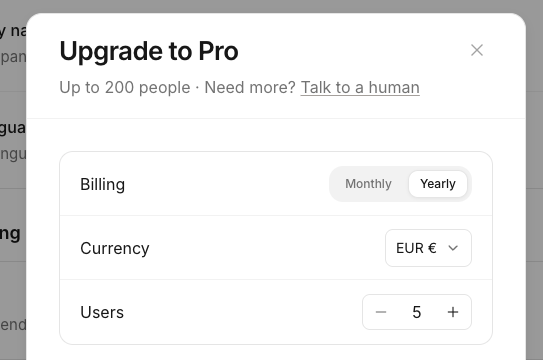
You pay by card. You can buy Pro online for up to 200 people. For more, click **Talk to a human** in the upgrade dialog.
If Noon manages your plan, **Contact us** replaces **View invoices**.
## Upgrade to Pro
{% stepper %}
{% step %}
### Open the upgrade dialog
Go to **Settings** → **General**. In **Plan & billing**, click **Upgrade**.
{% endstep %}
{% step %}
### Choose how you pay
In the **Upgrade to Pro** dialog, choose **Monthly** or **Yearly** under **Billing**, then a **Currency**, USD or EUR. Under **Users**, choose how many people to pay for. You can't choose fewer users than your workspace has. **Total** shows the price.
{% endstep %}
{% step %}
### Pay by card
Click **Upgrade plan**, then enter your card details on the checkout page.
{% endstep %}
{% step %}
### Check that it works
Noon takes you back to **Settings** and shows "Your workspace is now on the Pro plan." If it says "Payment received. Your plan will update shortly" and still shows the old plan after a while, [contact support](https://help.noon.security/trust-and-support/contact-support).
{% endstep %}
{% endstepper %}
## Open the billing portal
{% stepper %}
{% step %}
### Open Plan & billing
Go to **Settings** → **General**. In **Plan & billing**, click **View invoices**. It appears after you upgrade.
{% endstep %}
{% step %}
### Use the billing portal
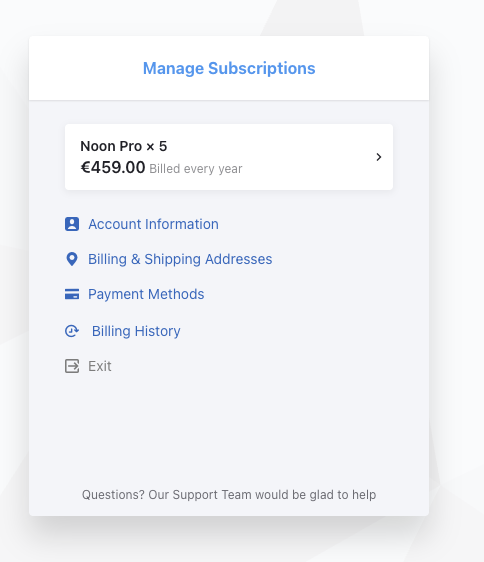
Noon opens **Manage Subscriptions**, the billing portal. Choose what you need:
* **Billing History**: download invoices.
* **Payment Methods**: update your card.
* **Account Information** and **Billing & Shipping Addresses**: change the company name, address, and VAT number on your invoices.
* **Exit**: go back to Noon.
You can also cancel the subscription here. The plan stays active until the end of the period you paid for, and **Plan & billing** then shows when it stops.
{% endstep %}
{% endstepper %}
You can't change the number of users in the billing portal.
The billing portal doesn't open
If Noon says the billing account is shared with another Noon product, it can't open the portal here. [Contact support](https://help.noon.security/trust-and-support/contact-support) for your invoices.