
Courses
How Noon courses work, and what the Courses page shows.
Courses assign security lessons to people in your workspace and record who finishes them. The employee takes the course from Courses in the employee portal.
#Follow up on who has not finished
Open a course on the Courses tab to see who has not finished each lesson. See Course results. The Results tab lists everyone against every course.
The lesson that follows a phishing simulation belongs to that simulation. A course is assigned from Courses.
#What the overview shows
- Coverage rate: the share of employees who have been assigned training.
- Courses completed: lessons people have finished.
- Average days to complete: how long finished lessons took.
Each number is compared with the previous week.
#The course list
The Courses tab lists every course in the workspace. Click Add course at the top of the page to start a new one.
- Status: Planned, In progress, Paused, Completed, or Archived.
- Course: the name.
- People: who is enrolled.
- Schedule: All at once, Daily, Weekly, or Monthly.
- Lessons: All Lessons, or how many lessons the course includes.
- Completion rate: the share of the course that is finished.
Search the table, or filter it by In progress, Paused, or Completed. Open a course to see who has finished each lesson.
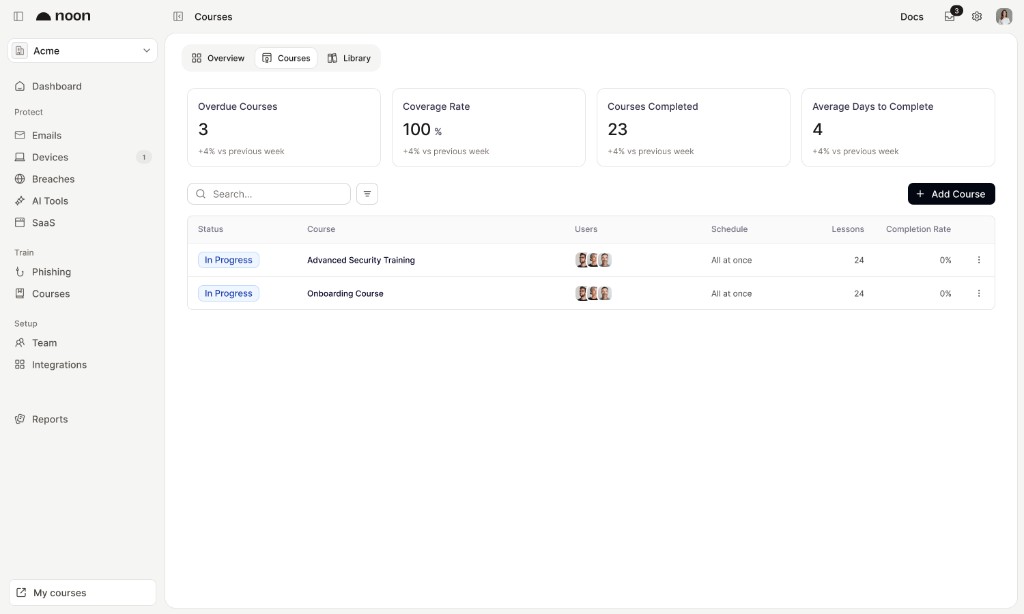
The Courses tab shows the numbers and every course in the workspace.
The Results tab shows everyone against each course. The Library tab lists the lessons a course can include. See Course results and Lesson library.
#Who can be enrolled
Connect Google Workspace or Microsoft 365 so Noon knows who to enroll. People and groups come from that directory. See People and groups.