
Course results
Read who has finished each lesson in a course.
Open a course on the Courses tab when you need to see who has not finished. Expired means the lesson expired before it was finished. Not started means it has not been opened.
The course shows its status next to its name, and 2 numbers: Lessons completed and Failed lessons. Each is compared with the previous week.
The table lists everyone enrolled. Each column is a lesson.
- Passed: the lesson was passed.
- Failed: the lesson was not passed.
- Expired: the lesson expired before it was finished.
- In progress: the lesson has been started.
- Not started: the lesson has not been opened.
Search by person.
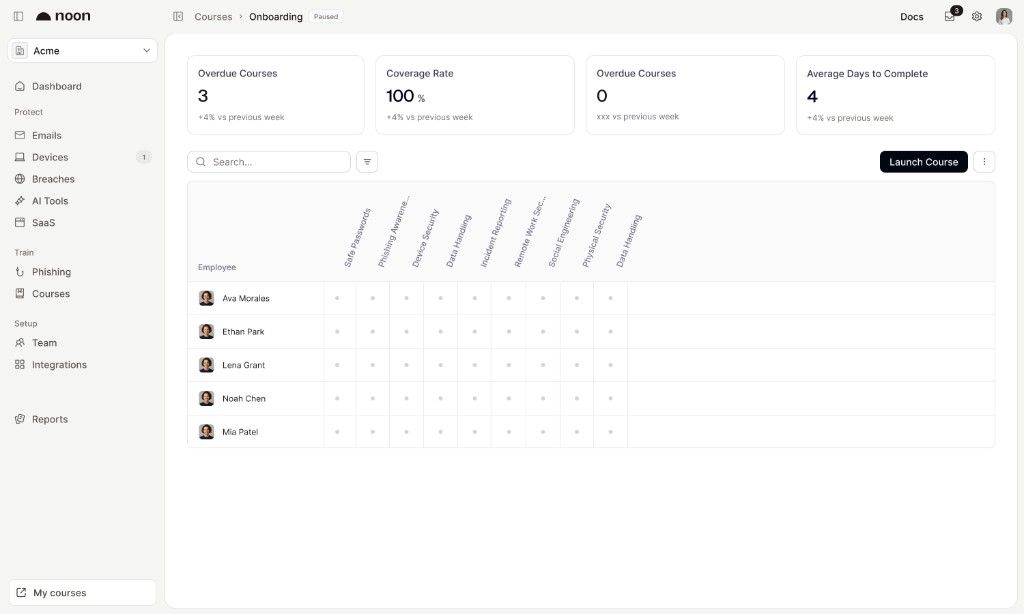
#See everyone on the Results tab
The Results tab shows the same statuses for every course at once. It has the same numbers as the Courses tab: Coverage rate, Courses completed, and Average days to complete.
Each row is a person and each column is a lesson, grouped by course. Search by person, or sort the list by name. Use the filter to show only courses with a Course status of In progress, Paused, or Completed, or to pick specific courses.
Until a course is launched, the tab shows No courses and Add a course.